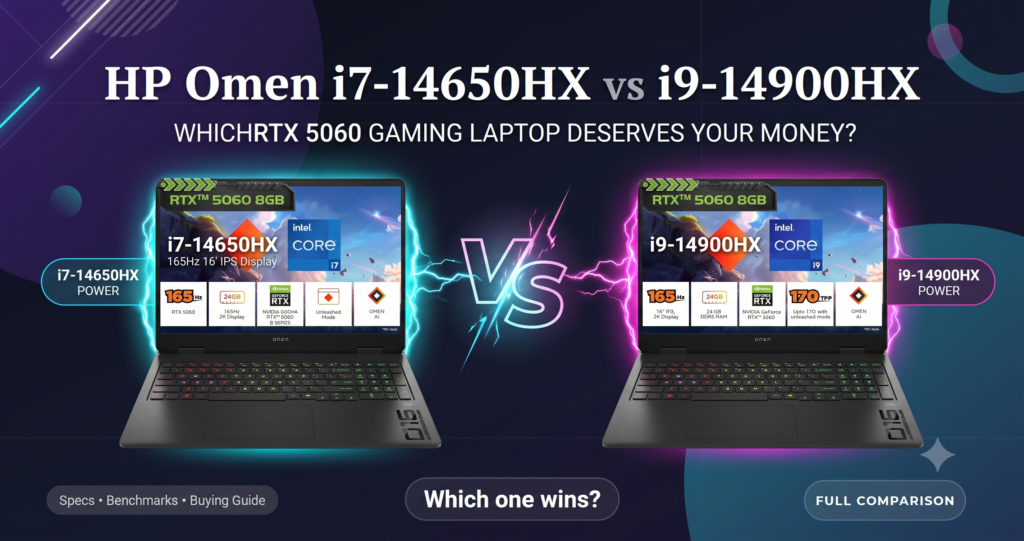
If you’ve been hunting for a gaming laptop that doesn’t force you to choose between raw performance, a crisp high-refresh display, and a design that actually looks premium, HP’s latest Omen lineup deserves your attention. HP has just refreshed its Omen series with two powerhouse configurations — the HP Omen SmartChoice (AM0239TX) with an Intel Core i7-14650HX, and the HP Omen (AM0279TX) with the beastly Intel Core i9-14900HX. Both machines pack an RTX 5060 GPU, a stunning 165Hz 2K display, and enough RAM headroom to handle anything from competitive esports to full-blown content creation.
But which one is right for you? In this detailed breakdown, we’ll compare specs, performance, design, and value so you can make a confident buying decision — and grab the best deal through the Amazon affiliate link below.
👉 Check current price and availability on Amazon: [HP Omen i7-14650HX,i9-14900HX]
Quick Specs Overview
| Feature | HP Omen SmartChoice (AM0239TX) | HP Omen (AM0279TX) |
|---|---|---|
| Processor | Intel Core i7-14650HX (14th Gen) | Intel Core i9-14900HX (14th Gen) |
| Graphics | 8GB NVIDIA RTX 5060 | 8GB NVIDIA RTX 5060 |
| RAM | 24GB DDR5 (Upgradeable) | 24GB DDR5 (Upgradeable) |
| Storage | 1TB SSD | 1TB SSD |
| Display | 16″ WUXGA 2K, 165Hz, 3ms, 400 nits | 16″ WUXGA 2K, 165Hz, 3ms, 400 nits |
| OS & Software | Windows 11, Office 2024 | Windows 11, M365 + Office 2024 |
| Weight | 2.4 kg | 2.43 kg |
| Lighting | RGB Keyboard | RGB Keyboard |
| Color | Black | Black |
At first glance, these two laptops look nearly identical — and in many ways, they are. Same chassis, same display, same GPU, same memory and storage configuration. The real difference boils down to two things: the processor and the bundled software. Let’s dig into why that matters.
Processor Showdown: Intel Core i7-14650HX vs Core i9-14900HX
This is the single biggest differentiator between these two laptops, so let’s break it down properly.
HP Omen SmartChoice — Intel Core i7-14650HX
The i7-14650HX is part of Intel’s 14th Gen “Raptor Lake Refresh” HX-series mobile processors, built for high-performance laptops. It features a hybrid architecture combining Performance-cores (P-cores) and Efficient-cores (E-cores), giving you excellent multi-threaded performance for gaming, streaming, and everyday multitasking without draining battery life unnecessarily. For the vast majority of gamers — especially those playing at 1080p to 2K resolutions where the GPU tends to be the bottleneck anyway — the i7-14650HX delivers more than enough horsepower.
HP Omen — Intel Core i9-14900HX
The i9-14900HX sits at the very top of Intel’s mobile lineup. It offers a higher core count, higher boost clocks, and significantly more L3 cache than the i7 variant. This translates to noticeably faster performance in CPU-intensive tasks: video editing, 3D rendering, large-scale compilation, streaming while gaming, and heavily multi-threaded workloads. If you’re a content creator who edits 4K footage, runs virtual machines, or streams your gameplay while running Discord, OBS, and a browser with 30 tabs open, the i9 gives you real, tangible headroom.
Which CPU matters more for gaming?
Here’s the honest truth: at 2K resolution with an RTX 5060, most games will be GPU-bound, not CPU-bound. That means the difference in actual in-game FPS between the i7 and i9 variant will be smaller than the spec sheet suggests — often within single-digit percentage points in GPU-heavy AAA titles. Where the i9 pulls ahead is in CPU-heavy games (simulation-heavy titles, strategy games with huge unit counts, or open-world games with complex physics) and, more importantly, in non-gaming productivity tasks.
Verdict: If gaming is your primary use case, the i7-14650HX in the SmartChoice model is the smarter buy — you get 90-95% of the gaming performance for a lower price. If you’re a hybrid gamer-creator who also edits video or does heavy multitasking, the i9-14900HX earns its premium.
Graphics: RTX 5060 — Identical on Both
Both laptops come equipped with an 8GB NVIDIA RTX 5060, which is genuinely the star of the show here. This is where most of your gaming performance actually comes from, and thankfully, HP hasn’t cut any corners on either model.
The RTX 5060 brings:
- DLSS 4 support with Multi Frame Generation, which can dramatically boost frame rates in supported titles without a major hit to visual fidelity.
- Ray tracing capability, letting you enjoy realistic lighting, reflections, and shadows in supported AAA titles.
- 8GB of dedicated VRAM, which comfortably handles 2K gaming at high-to-ultra settings in most current titles, and 1080p gaming at maxed-out settings with high refresh rates.
- Efficient power draw, meaning better thermals and battery life compared to older-generation GPUs at similar performance tiers.
Paired with the 165Hz refresh rate display, this GPU is well-matched to the panel — you’ll actually be able to hit frame rates that take advantage of that smooth refresh rate in competitive titles like Valorant, CS2, and Apex Legends, while also having enough grunt for story-driven AAA titles at 2K resolution.
Display: A Genuine Highlight
Both laptops share the exact same 16-inch panel, and it’s a genuinely excellent one for the price point:
- Resolution: 2K WUXGA (2560 x 1600)
- Refresh Rate: 165Hz
- Response Time: 3ms
- Brightness: 400 nits
- Screen Size: 16 inches / 40.6cm
This combination is close to the sweet spot for a gaming laptop display in 2024. The 2K resolution gives you noticeably sharper visuals and more screen real estate than a standard 1080p panel — great for both gaming immersion and productivity work like video editing timelines or spreadsheet work. The 165Hz refresh rate keeps motion buttery smooth, and the 3ms response time minimizes ghosting during fast-paced action. At 400 nits, the panel is bright enough for comfortable indoor use, including well-lit rooms, though it may feel slightly dim in direct sunlight (a minor consideration for a laptop primarily meant to be used indoors for gaming).
Memory & Storage: Generous and Future-Proof
Both models ship with:
- 24GB DDR5 RAM (Upgradeable)
- 1TB SSD storage
24GB is a smart, above-average starting point in 2024 — most competitors still ship 16GB as standard. This extra headroom matters more than people realize: modern AAA games, background apps, Discord, browser tabs, and streaming software all eat into your RAM pool quickly. Having 24GB reduces stuttering from memory swapping and future-proofs you against increasingly RAM-hungry titles.
The fact that it’s upgradeable is a huge plus — many modern laptops solder RAM directly to the motherboard, making future upgrades impossible. HP giving you upgrade flexibility means you can bump up to 32GB or more down the line without buying an entirely new laptop.
1TB of SSD storage is a comfortable amount for most users — enough room for your OS, a handful of AAA titles (which increasingly demand 50-100GB+ each), your creative software, and general files, without needing an external drive immediately.
Software: Where the Two Models Actually Diverge
This is a subtle but important difference:
- HP Omen SmartChoice (AM0239TX): Windows 11 + Office 2024
- HP Omen (AM0279TX): Windows 11 + M365 (Microsoft 365) + Office 2024
The AM0279TX bundles in a Microsoft 365 subscription alongside Office 2024, which is a nice added value if you don’t already have an active M365 subscription — you get cloud storage via OneDrive, continuously updated Office apps, and additional Microsoft services baked in. If you already pay for M365 separately, this becomes less of a differentiator, but for someone starting fresh, it does add tangible value to the i9 configuration.
Design, Build & Portability
Both laptops share the same Black color scheme, the same RGB keyboard lighting, and nearly identical weight:
- SmartChoice (i7): 2.4 kg
- Omen (i9): 2.43 kg
The 30-gram difference is negligible in real-world use — both fall into the “desktop-replacement” category rather than the ultra-portable category, which is expected given the performance hardware, 16-inch display, and robust cooling systems required to keep an i9 and RTX 5060 running cool under load. The RGB keyboard lighting on both models allows for that classic gaming laptop aesthetic, with customization typically available through HP’s Omen Gaming Hub software, letting you sync lighting effects, monitor system performance, and manage power profiles.
Price-to-Performance: Which One Should You Actually Buy?
Here’s where it comes down to your specific needs and budget:
Choose the HP Omen SmartChoice (i7-14650HX, AM0239TX) if:
- Gaming is your primary or sole use case
- You want maximum value — similar gaming performance to the i9 model at a lower price point
- You don’t do heavy video editing, 3D rendering, or CPU-intensive multitasking
- You’re okay with Office 2024 without the added M365 subscription
Choose the HP Omen (i9-14900HX, AM0279TX) if:
- You’re a content creator, streamer, or do CPU-heavy work alongside gaming
- You want the absolute best CPU performance available in this generation
- The bundled M365 subscription adds genuine value for your workflow
- You don’t mind paying a premium for future-proofing and multitasking headroom
For the vast majority of gamers, the HP Omen SmartChoice with the i7-14650HX is the smarter, more value-conscious pick — you’re getting essentially the same gaming experience (same GPU, same display, same RAM/storage) at a lower cost, since the CPU bottleneck rarely shows up at 2K gaming resolutions with this class of hardware.
However, if you’re someone who edits videos, streams while gaming, runs demanding productivity software, or simply wants the peace of mind of owning the top-tier chip with room to spare for years to come, the i9-14900HX variant is worth the upgrade.
Final Verdict
Both the HP Omen SmartChoice (AM0239TX) and the HP Omen (AM0279TX) are genuinely impressive gaming laptops for 2024, offering a rare combination of a high-refresh 2K display, a capable RTX 5060 GPU, generous and upgradeable RAM, and a solid 1TB SSD — all wrapped in a sleek black RGB-lit chassis. The choice ultimately comes down to how you plan to use the laptop: pure gaming favors the i7 SmartChoice model for its better value, while creators and power users will appreciate the extra muscle (and bundled M365 subscription) of the i9 variant.
Whichever one fits your needs, both represent strong value in the current gaming laptop market, especially with the RTX 5060’s excellent price-to-performance ratio and DLSS 4 support future-proofing your gaming experience for the next few years.
Ready to upgrade your gaming setup? Check live pricing, deals, and availability here
Disclosure: This post contains affiliate links. If you purchase through these links, we may earn a small commission at no extra cost to you. This helps support the blog and allows us to continue creating in-depth, honest reviews.
Please Follow Me on Social Media
Following me on social media is as easy as a few clicks. Simply search for my handle or name on your preferred social media platform and hit that “Follow” or “Subscribe” button. Here are the platforms you can find me on:
- Twitter: @ShahSumsh
- Instagram: @shah.alam.shumsh
- Facebook: ShahTech
- LinkedIn: YourProfile
- YouTube: ShahTech